
Custom Block Editor Support (Pro)
(Pro): Use Dynamic Meta Box Builder as the field storage and editing foundation for custom Gutenberg blocks in your own plugin or theme. Custom block REST integration requires an active Pro license or eligible trial.
License renewal and Pro access
If you do not renew an expiring DMGB Pro license, paid feature editing and configuration will be locked after expiry unless you have another active license or an eligible trial. This includes Pro field editing, custom block REST integration, new WooCommerce customer inputs and field writes, and Elementor tag configuration and editor previews. Existing saved values and supported read-only frontend output remain available in the premium edition. Renew and activate the license to restore access; a still-valid lifetime license does not need renewal.
Built-in visual field display
For display without writing your own block, insert the native DMBB Field block and select a saved field in its Block settings sidebar. Text, Textarea, Email, Number and URL display is included in Free. Compatible Pro field choices and editor previews require active Pro access; saved Pro blocks can retain supported read-only frontend output in the installed premium edition after expiry. The block supports current post/Query Loop context, a specific post, Public values, safe display options and authenticated live preview. It does not write field values. Password, Hidden and protected metadata keys are excluded.
See DMBB Field Block (Free) for visual selection, source options and display examples, and Custom Post Types & Taxonomies (Free) for content structure and FSE templates. The developer editing APIs described below belong to Custom Block Editor Support (Pro); DMGB native metadata REST and post-value requests require Pro access.
1. What the plugin supports
Custom Block Editor Support is a Pro integration. DMGB native REST metadata integration and the post-value endpoint require an active Pro license or eligible trial, even for a Text or another free field type. The five free types remain available through ordinary post/page meta-box controls in both Classic Editor and Gutenberg. Saved values and existing PHP rendering remain available after license expiry. WordPress block registration and direct PHP metadata functions are supplied by WordPress; Pro licensing applies to the integration supplied by DMGB.
DMGB defines fields, stores values, supplies editor controls and registers compatible post metadata with WordPress. Your own block plugin or theme provides the block registration, JavaScript editor, design and front-end rendering. The examples on this page describe that integration; opening this guide does not create a block.
- Post/Page fields: one value per field key and post. Compatible types are available to authenticated block-editor requests through native WordPress REST metadata.
- Repeaters: one-level arrays managed through the DMGB post-value endpoint. They are not exposed as native editable REST metadata.
- Public fields: site-wide settings read in PHP with the Public getter. They are not part of a post’s native REST metadata.
- Block attributes: use these in your own block for values that belong to each individual block instance.
Two blocks editing the same DMGB key on the same post share that value. For two cards with different titles, store their titles in block attributes, or use separate keys/a Repeater when the data should belong to the post. Use a stable project namespace for block names, functions and field keys.
2. Configure the fields before writing block code
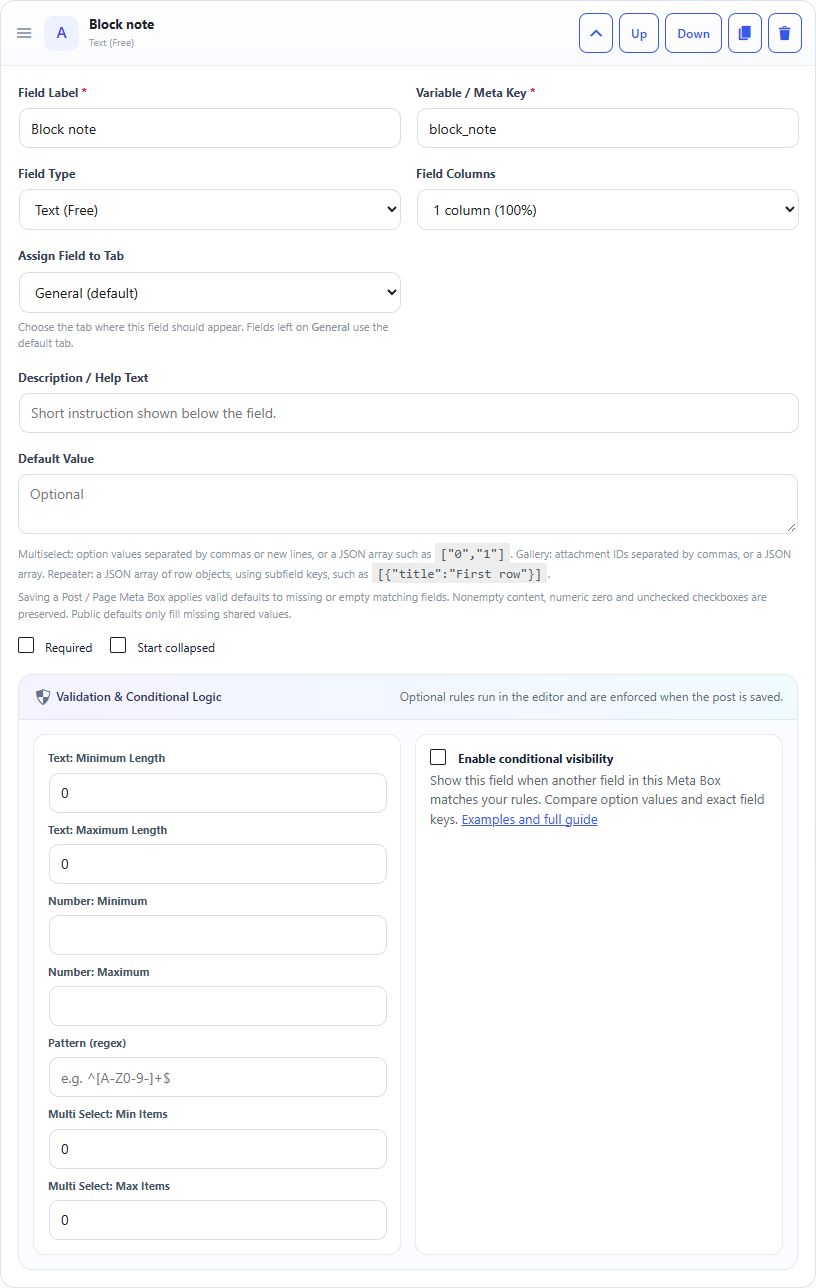
Create a dedicated Post / Page Meta Box with ID block_editor_note, context Normal, targeting the Post post type. Add only one Text field with the exact key block_note. Save the definition, open a matching post, enter a value and save the post. This is the field used by the complete example below. Text is a free field type for ordinary meta-box editing; editing it through the custom block REST integration requires active Pro access.
The companion PHP example hides only this dedicated box in Gutenberg so its older input cannot overwrite the custom block’s edit. The box remains available in the Classic Editor. Insert your custom block to edit this field in Gutenberg, and do not add unrelated fields to the dedicated tutorial box.
Use your own unique keys when adapting the example. Do not register an existing DMGB key again with unrestricted permissions or a different schema. DMGB registers compatible metadata at init priority 20 and preserves registrations already owned by another integration.
For a custom post type, its registration must enable show_in_rest and support editor and custom-fields; the editor must also allow blocks. Add support in the code that owns the post type, before DMGB registers metadata. The following optional example assumes your project already registered a post type named book; it does not create that post type.
Optional custom post type support
add_action( 'init', function () {
    if ( post_type_exists( 'book' ) ) {
        add_post_type_support( 'book', 'custom-fields' );
    }
}, 15 );
Screenshots and walkthrough
Screenshots use sample data and English labels. Follow the translated instructions on this page; your theme, language, permissions and license can change the available controls. Select an image to view it at full size.
3. Prepare your own block project
Keep custom block code in your own companion plugin or a theme-maintained project so a DMGB update preserves it. Use a current Node.js environment supported by the WordPress build tools. WordPress’s @wordpress/create-block command can scaffold a dynamic block project:
After scaffolding, keep the generated package scripts and dependency setup. Adapt the generated source files to the examples below and run npm run build. The scaffold’s exact folders can change between tool versions: the PHP registration path must point to the folder containing the compiled block.json, index.js and index.asset.php. For this walkthrough, that folder is build/dmgb-note. Adjust the path if your project uses build instead.
The complete example uses Block API version 3 and therefore requires WordPress 6.3 or newer in your companion project. DMGB’s own minimum remains WordPress 5.8. Projects supporting older WordPress versions need a compatible Block API version and their own tests. Block Bindings below require WordPress 6.5 or newer.
Commands run inside your development environment
npx @wordpress/create-block@latest dmgb-note --namespace=my-site --variant=dynamic
cd dmgb-note
npm run build
# During development, use npm start to rebuild after changes.
4. Define the block metadata
Use the following block.json for the example block. Keep this metadata in the source folder selected by your build setup. Replace the generated block metadata, and replace its generated editor/save code with the next example. The PHP callback in section 6 replaces a generated render.php registration for this walkthrough, so this metadata intentionally has no render property.
usesContext lets the block receive the post ID and type, including inside a Query Loop. This block’s editor changes values only on the post currently being edited; a different Query Loop record is displayed read-only. The compiled asset file supplies WordPress script dependencies and must be deployed with the compiled JavaScript. JSX and npm package imports cannot be loaded directly as a browser script.
Example block.json
{
    "$schema": "https://schemas.wp.org/trunk/block.json",
    "apiVersion": 3,
    "name": "my-site/dmgb-note",
    "title": "DMGB Note",
    "category": "widgets",
    "icon": "edit",
    "textdomain": "my-site-blocks",
    "usesContext": [ "postId", "postType" ],
    "supports": { "html": false },
    "editorScript": "file:./index.js"
}
5. Read and edit the field in Gutenberg
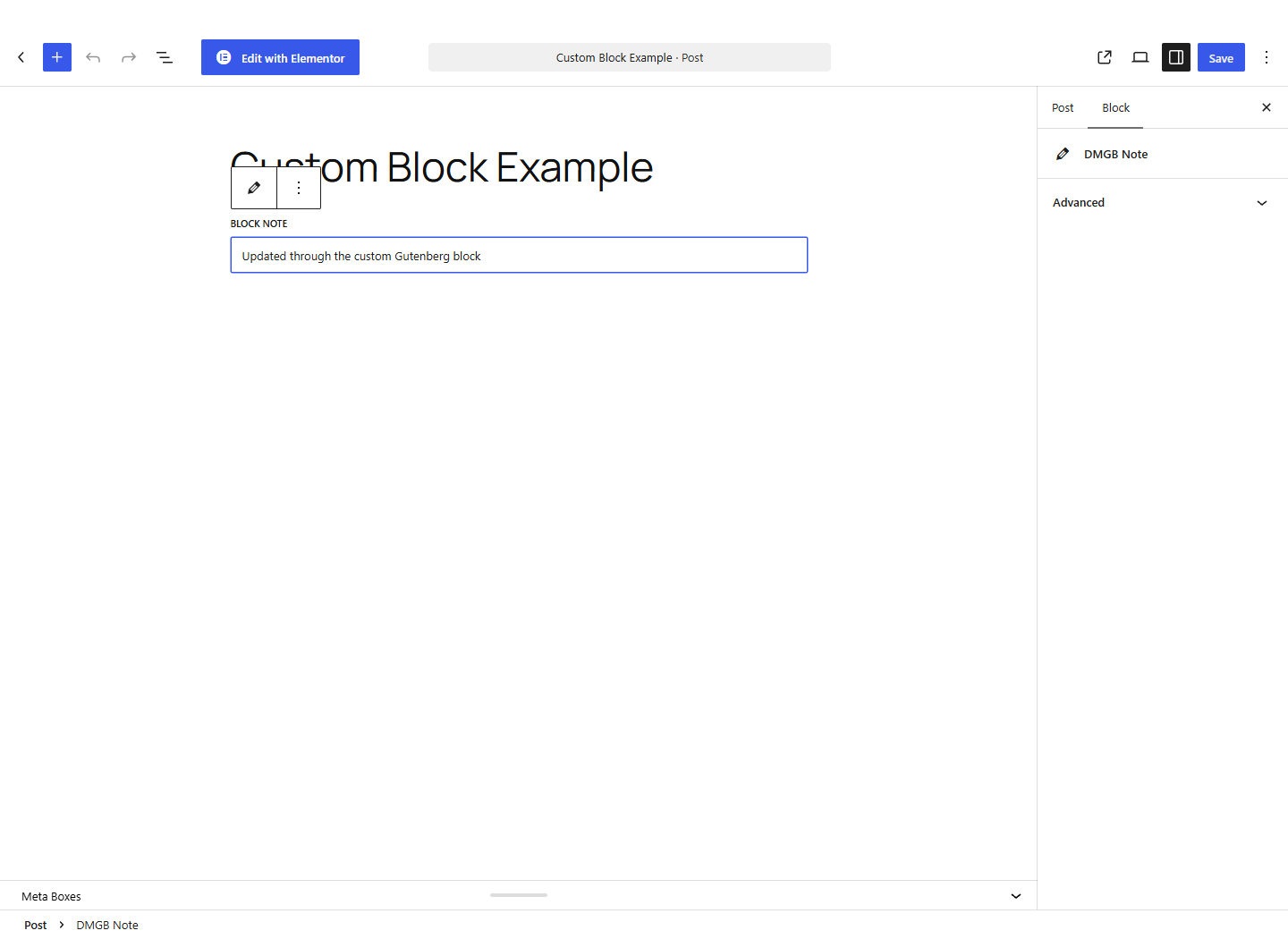
The following is a complete editor entry file, placed beside the source block.json and built into index.js. It uses WordPress’s useEntityProp hook to read and update the post’s metadata. The updated value is staged in Gutenberg and saved when the editor clicks Save/Update/Publish.
Merge the existing metadata object so editing this field does not discard other fields. A missing key can mean the post type, targeting, permissions or license does not permit access; the example disables editing instead of inventing an unrestricted registration. Block previews without a real post may also lack metadata. The save function returns null because PHP renders the current value rather than saving a duplicate text snapshot in the block markup.
Editor entry: index.js
import { registerBlockType } from '@wordpress/blocks';
import { useBlockProps } from '@wordpress/block-editor';
import { TextControl, Notice } from '@wordpress/components';
import { useSelect } from '@wordpress/data';
import { useEntityProp } from '@wordpress/core-data';
import { __ } from '@wordpress/i18n';
import metadata from './block.json';

function Edit( { context = {} } ) {
    const editor = useSelect( ( select ) => ( {
        id: select( 'core/editor' ).getCurrentPostId(),
        type: select( 'core/editor' ).getCurrentPostType(),
    } ), [] );
    const postId = context.postId || editor.id;
    const postType = context.postType || editor.type;
    const [ meta, setMeta ] = useEntityProp( 'postType', postType, 'meta', postId );
    const blockProps = useBlockProps();
    const available = !!meta && Object.prototype.hasOwnProperty.call( meta, 'block_note' );
    const editable = available && Number( postId ) === Number( editor.id )
        && postType === editor.type;

    return (
        <div { ...blockProps }>
            { !available && (
                <Notice status="info" isDismissible={ false }>
                    { __( 'Field unavailable. Check the post, targeting and permissions.', 'my-site-blocks' ) }
                </Notice>
            ) }
            <TextControl
                label={ __( 'Block note', 'my-site-blocks' ) }
                value={ available ? String( meta.block_note ?? '' ) : '' }
                disabled={ !editable }
                onChange={ ( value ) => {
                    if ( editable ) {
                        setMeta( { ...meta, block_note: value } );
                    }
                } }
            />
        </div>
    );
}

registerBlockType( metadata.name, {
    ...metadata,
    edit: Edit,
    save: () => null,
} );
Screenshots and walkthrough
Screenshots use sample data and English labels. Follow the translated instructions on this page; your theme, language, permissions and license can change the available controls. Select an image to view it at full size.
6. Register and render the dynamic block in PHP
In your companion plugin’s main PHP file, keep one plugin header and one registration for this block. Replace the scaffold’s registration with the example below and adjust the compiled folder path. The fixed field key makes the decision to display block_note explicit; avoid accepting an arbitrary field key from untrusted block attributes.
The callback uses the block’s post context rather than the global post, so Query Loop results can render the correct value. It protects password-protected and unreadable posts, escapes text and adds the block wrapper attributes. Targeting controls which editors can edit fields; it is not a front-end visibility policy. Choose deliberately which fields your block publishes. Other post types should be added to this example’s explicit allowlist only when your project intends to display their data.
Companion plugin registration and render callback
<?php
/**
 * Plugin Name: My Site DMGB Note Block
 * Requires at least: 6.3
 * Text Domain: my-site-blocks
 */
if ( ! defined( 'ABSPATH' ) ) {
    exit;
}

add_action( 'init', function () {
    register_block_type( __DIR__ . '/build/dmgb-note', array(
        'render_callback' => 'my_site_render_dmgb_note',
    ) );
}, 30 );

// Replace only the dedicated tutorial box's Gutenberg editing interface.
add_action( 'add_meta_boxes', function ( $post_type, $post ) {
    if ( function_exists( 'dmgb_can_use_custom_block_support' )
        && dmgb_can_use_custom_block_support()
        && 'post' === $post_type && $post instanceof WP_Post
        && use_block_editor_for_post( $post ) ) {
        remove_meta_box( 'dmgb_block_editor_note', $post_type, 'normal' );
    }
}, 100, 2 );

function my_site_render_dmgb_note( $attributes, $content, $block ) {
    $post_id = absint( $block->context['postId'] ?? 0 );
    $post = get_post( $post_id );
    if ( ! $post || ! in_array( $post->post_type, array( 'post' ), true ) ) {
        return '';
    }
    if ( post_password_required( $post ) || (
        ! is_post_publicly_viewable( $post ) && ! current_user_can( 'read_post', $post_id )
    ) ) {
        return '';
    }
    $value = get_post_meta( $post_id, 'block_note', true );
    if ( ! is_scalar( $value ) || '' === (string) $value ) {
        return '';
    }
    return '<p ' . get_block_wrapper_attributes() . '>'
        . esc_html( (string) $value ) . '</p>';
}
7. Choose the right value type and output format
- Strings: Text, Textarea, Email, URL, Password, Date, Date & Time, Color, Select, Radio, WYSIWYG and Hidden use native REST strings.
- Number: native REST number; send a numeric JSON value, not a numeric string.
- Checkbox: native REST boolean; send
trueorfalse. - Image: native REST integer attachment ID, not an image URL.
- Gallery: array of integer attachment IDs.
- Multi Select: array of option-value strings. Send saved option values, not translated display labels.
- Repeater: array of row objects through the DMGB endpoint; row keys are configured subfield keys.
Native REST casts values to its registered schema. Direct PHP metadata reads and the DMGB endpoint can return scalar values as strings, and a missing field can be an empty string. Normalize carefully in your integration. Do not turn an intentionally empty saved value into a default with a truthiness check. Use metadata_exists() when you need to distinguish an absent post value from an empty saved value.
Escape for the actual output context: esc_html() for text, esc_attr() for attributes, esc_url() for links, wp_kses_post() for permitted rich text, and WordPress attachment functions for media. Password fields only mask editor input; their stored values are not encrypted. Password and Hidden fields must not be treated as safe public content.
Output examples inside a render callback with an authorized post ID
$output = '';
$url = get_post_meta( $post_id, 'detail_url', true );
if ( is_string( $url ) && '' !== esc_url( $url ) ) {
    $output .= '<a href="' . esc_url( $url ) . '">View details</a>';
}

$raw_image_id = get_post_meta( $post_id, 'hero_image', true );
$image_id = 0;
if ( ( is_int( $raw_image_id ) || is_string( $raw_image_id ) )
    && preg_match( '/^[1-9][0-9]*$/D', (string) $raw_image_id )
    && (string) (int) $raw_image_id === (string) $raw_image_id ) {
    $image_id = (int) $raw_image_id;
}
$attachment = $image_id ? get_post( $image_id ) : null;
$parent = $attachment && $attachment->post_parent
    ? get_post( $attachment->post_parent ) : null;
if ( $attachment && 'attachment' === $attachment->post_type
    && wp_attachment_is_image( $image_id )
    && in_array( $attachment->post_status, array( 'inherit', 'publish' ), true )
    && ! post_password_required( $attachment )
    && ( ! $attachment->post_parent || ( $parent
        && is_post_publicly_viewable( $parent )
        && ! post_password_required( $parent ) ) ) ) {
    $output .= wp_get_attachment_image( $image_id, 'large' );
}

$rich_text = get_post_meta( $post_id, 'rich_description', true );
$output .= is_string( $rich_text ) ? wp_kses_post( $rich_text ) : '';
return $output;
8. Native REST requests, authentication and validation
Pro API: Active Pro access or an eligible trial is required to read or update DMGB field values through native REST metadata or the DMGB post-value endpoint. A locked integration returns a 403 license error for value API requests; native editor responses omit DMGB fields. Other post content can still be saved normally.
Inside WordPress admin, use the registered @wordpress/api-fetch package; WordPress supplies its REST root and cookie nonce middleware. Keep requests on the current site. External clients need WordPress-supported authentication, such as Application Passwords over HTTPS; never embed credentials in public JavaScript.
On core /wp/v2/ endpoints, read DMGB-owned fields with context=edit. The user must be allowed to edit the post and each metadata key, and the box must match targeting. Anonymous, view and embed responses omit these fields. Post, Page and custom post types can have different REST base paths; discover the correct base for your post type instead of assuming every type uses posts.
The native write payload wraps values in meta. DMGB applies targeting, permissions, sanitization, licensing and validation, and rejects invalid native submissions before the post is changed. Empty text can use an empty string, arrays can use an empty array, and a Checkbox can use false, when validation permits. Do not send null to clear a field. An optional blank Number does not fit the native numeric schema; use the DMGB endpoint for that case. Image 0 represents no attachment when permitted.
This direct request example saves immediately; it is separate from the staged useEntityProp workflow. Choose one workflow for a given control and report errors to the editor.
Native REST example for an existing Post
import apiFetch from '@wordpress/api-fetch';

export async function updateNoteImmediately( postId, value ) {
    const id = Number( postId );
    if ( !Number.isInteger( id ) || id < 1 ) {
        throw new Error( 'Save the post before requesting metadata.' );
    }
    return apiFetch( {
        path: `/wp/v2/posts/${ id }?context=edit`,
        method: 'POST',
        data: { meta: { block_note: value } },
    } );
}
9. Read and save Repeater rows
With active Pro access, create a Repeater field named feature_rows with Text subfields title and details. The example helper below uses the DMGB endpoint rather than useEntityProp. Call its save function from an explicit button in your own React control; it is not automatically saved by Gutenberg’s Update button. First save a new post so it has a real ID.
The DMGB read response is { post_id, fields }. Its write body is a flat object of field keys and values, without a meta wrapper. Successful writes return { post_id, updated }. HTTP 422 can contain data.fields validation errors and data.updated values that were already saved: valid fields can save even if another submitted field fails. Re-fetch after a failed write before letting the user retry; do not assume this endpoint is an all-or-nothing transaction. A field absent from updated is not a confirmed save.
Limits, row validation, minimum/maximum rows, conditional visibility and license restrictions still apply. Nested Repeaters are unsupported. Rows multiplied by subfields must stay within 20,000 cells. Larger legacy values remain available to PHP; do not submit them unchanged through an editable control.
Repeater helpers for your block editor
import apiFetch from '@wordpress/api-fetch';

function metaPath( postId ) {
    const id = Number( postId );
    if ( !Number.isInteger( id ) || id < 1 ) {
        throw new Error( 'Save the post before requesting metadata.' );
    }
    return `/dmgb/v1/posts/${ id }/meta`;
}

export async function loadFeatureRows( postId ) {
    const result = await apiFetch( { path: metaPath( postId ) } );
    if ( !Object.prototype.hasOwnProperty.call( result.fields || {}, 'feature_rows' ) ) {
        throw new Error( 'The Repeater field is unavailable for this post and user.' );
    }
    return Array.isArray( result.fields?.feature_rows )
        ? result.fields.feature_rows : [];
}

export async function saveFeatureRows( postId, rows ) {
    try {
        const result = await apiFetch( {
            path: metaPath( postId ),
            method: 'POST',
            data: { feature_rows: rows },
        } );
        if ( !Object.prototype.hasOwnProperty.call( result.updated || {}, 'feature_rows' ) ) {
            throw new Error( 'The field was not updated. Check targeting, conditions and license.' );
        }
        return result.updated.feature_rows;
    } catch ( error ) {
        // Display error.message and error.data?.fields in your control.
        // A 422 response may also contain error.data?.updated.
        // Re-fetch server values before retrying a failed save.
        throw error;
    }
}

// Example rows; call from a control that reports pending/success/error state.
const rows = [ { title: 'Feature one', details: 'A useful detail' } ];
Render stored Repeater rows in an authorized PHP callback
$output = '';
$rows = get_post_meta( $post_id, 'feature_rows', true );
if ( is_array( $rows ) ) {
    $output .= '<ul>';
    foreach ( $rows as $row ) {
        if ( ! is_array( $row ) ) {
            continue;
        }
        $title = isset( $row['title'] ) && is_scalar( $row['title'] )
            ? (string) $row['title'] : '';
        $details = isset( $row['details'] ) && is_scalar( $row['details'] )
            ? (string) $row['details'] : '';
        $output .= '<li><strong>' . esc_html( $title ) . '</strong> '
            . esc_html( $details ) . '</li>';
    }
    $output .= '</ul>';
}
return $output;
10. Use shared Public values in a block
For a site-wide footer message, create a Public Text field named footer_text, save its definition and edit it under Public (Header & Footer). Read it with dmgb_get_public_value() inside your own dynamic block’s PHP render callback. It works without a current post, including Site Editor templates, archives and empty blog indexes.
Public values are not available through native post metadata or the DMGB post-value endpoint. The built-in DMBB Field block has an authenticated, allowlisted, read-only HTML preview endpoint that can render a configured Public field; it does not expose arbitrary raw Public values or edit them. Your own JavaScript preview can use your project’s PHP rendering integration or a separately designed endpoint with explicit field allowlists and permissions. Keep editing shared values on the existing Public settings screen unless you implement a secured settings workflow.
The Public getter returns sanitized configured defaults for missing values and preserves saved blanks. When WPML or Polylang is installed, supported Public text values follow the current front-end language. Post fields use the translated post’s own metadata; pass the translated post ID through block context. URLs, IDs, numbers and other technical values are not automatically translated.
Public value inside your PHP render callback
if ( ! function_exists( 'dmgb_get_public_value' ) ) {
    return '';
}
$footer_text = dmgb_get_public_value( 'footer_text', '' );
if ( ! is_scalar( $footer_text ) ) {
    return '';
}
return '<div ' . get_block_wrapper_attributes() . '>'
    . esc_html( (string) $footer_text ) . '</div>';
11. WordPress Block Bindings
(Pro): DMGB exposes compatible registered metadata to Block Bindings in the Pro edition. Active Pro access is required for editor REST reads and writes. Existing bindings in an installed Pro edition can continue reading saved values after expiry; the free edition does not expose DMGB metadata for this integration.
On WordPress 6.5 or newer, the built-in core/post-meta binding source can connect compatible registered metadata to supported core block attributes. It requires REST-enabled metadata and a key that does not begin with an underscore. Only bind fields you explicitly intend to publish. REST edit-context privacy does not make content printed by a front-end block private.
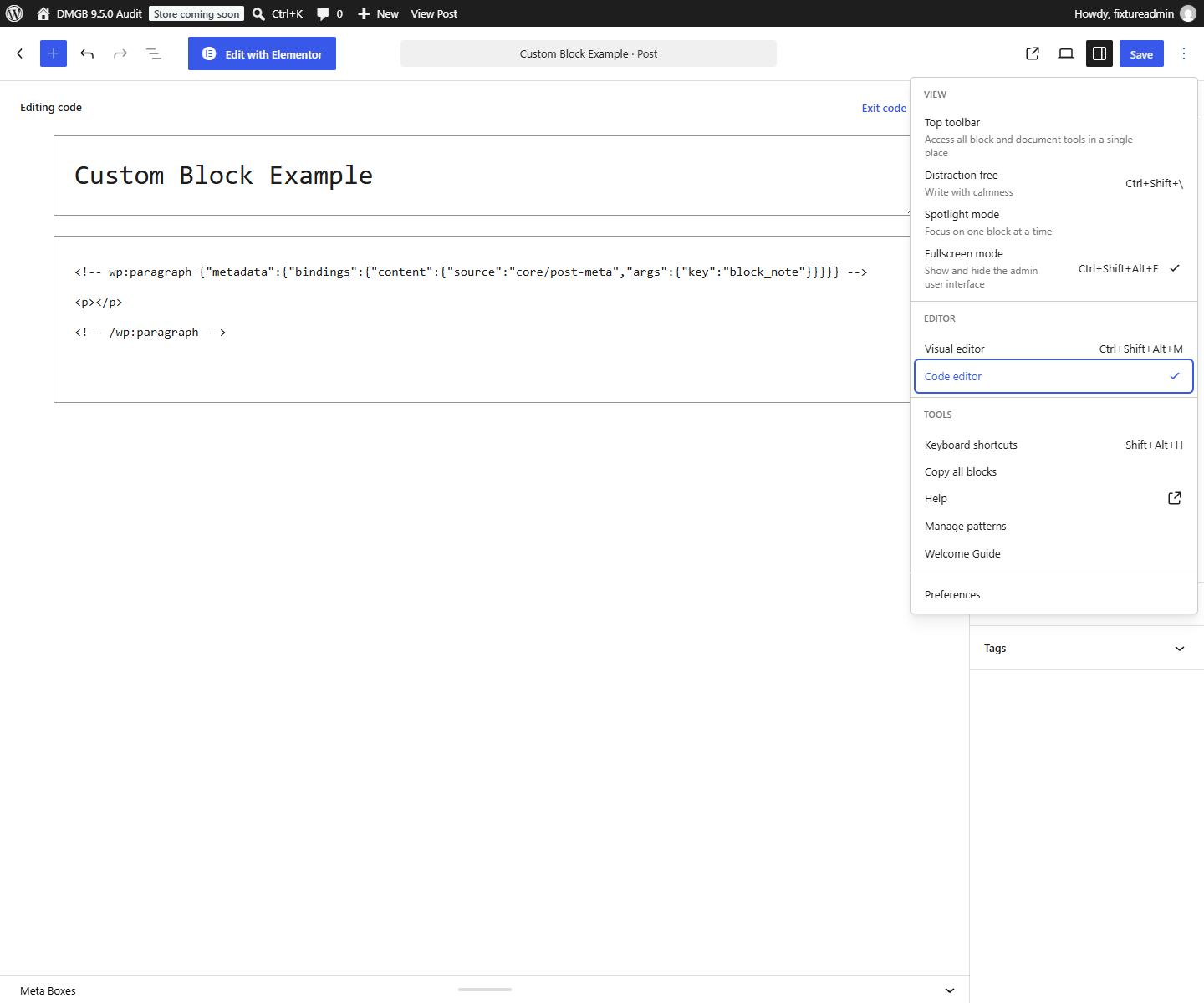
The following block markup binds a Paragraph’s content to the Text field block_note. Enter it in Gutenberg’s Code Editor on a matching post, or use it in a developer-maintained block template. Support and editor connection controls vary by WordPress version; verify them on your target version. DMGB does not add its own binding selector or custom binding source in this release.
Repeaters are not supported by the core metadata binding in this release. Public settings need a separately implemented custom binding source or a PHP-rendered block. An Image field stores an attachment ID; binding that ID directly to an image URL attribute does not convert it to a URL. Use an appropriate attachment lookup or your own dynamic render callback.
Paragraph binding markup
<!-- wp:paragraph {"metadata":{"bindings":{"content":{"source":"core/post-meta","args":{"key":"block_note"}}}}} -->
<p>Fallback content</p>
<!-- /wp:paragraph -->
Screenshots and walkthrough
Screenshots use sample data and English labels. Follow the translated instructions on this page; your theme, language, permissions and license can change the available controls. Select an image to view it at full size.
12. Targeting, conditions, licenses and duplicate controls
A field can disappear from an editor request when its box no longer matches the post, user, taxonomy, template or other targeting rules. Definition editing and the /dmgb/v1/boxes endpoints require manage_options; do not make an Author’s block depend on loading all definitions from that administrator-only endpoint. Configure known keys in your project, or design a narrowly scoped authorized discovery API.
DMGB’s existing controls implement conditional visibility. Your own React controls must implement their display logic; server-side validation remains authoritative. Send actual choice values and valid controller values, handle errors, and re-read values after immediate endpoint saves. A failed controller can block dependent writes. All DMGB custom block REST integration requires an active Pro license or eligible trial, including the five free field types. The definition-management endpoints retain their administrator capability requirement. Existing saved values remain available to PHP after expiry. The public helper dmgb_can_use_custom_block_support() reports license eligibility only; it does not authorize a user, select public fields or replace per-post/per-key permissions.
Avoid two unsynchronized editors for the same key. A custom block can stage a new native metadata value while the legacy DMGB meta-box control still holds its older value; the later compatibility form save can overwrite the newer edit. Provide one editing interface for that key, or explicitly synchronize both controls in your integration. Do not disable all meta boxes or remove unrelated fields just to integrate one block.
Post defaults initialize missing values through the plugin’s normal workflows; the generic PHP and DMGB REST getters read stored post metadata. Test a new post separately from an existing post with saved data. DMGB does not add metadata revision history or per-block storage. Direct update_post_meta() calls in your own code do not automatically reproduce the plugin’s complete targeting, validation and licensing workflow.
13. Build, deploy and test your integration
- Build your block assets and deploy the compiled metadata, JavaScript, asset dependency files and any styles with your companion plugin. Activate DMGB and your project, then reload the editor.
- Create a matching post, enter a value, save, reload and check the front end. Change the value from the custom block and confirm it persists. Check that unrelated metadata stays intact.
- Test missing values, saved blanks, zero numbers, unchecked Checkboxes, translated choice labels, media IDs and Repeater arrays. Verify required fields, invalid values and conditional controller errors.
- Test Author and Administrator roles, allowed/disallowed post types, targeting changes, free/expired and licensed modes, anonymous REST reads and invalid authentication.
- Test multiple block instances, Query Loop context, templates with no post, translated posts and Public fallbacks. Confirm private/password-protected content and sensitive fields are not published by your callback.
- Test fresh posts, save failures, immediate endpoint saves, unsynchronized legacy controls, post autosaves and revision expectations. Repeater endpoint writes need their own visible save/error state.
- Test each WordPress version supported by your companion project. Rebuild after JavaScript changes, clear relevant caches, and keep your own code outside DMGB’s update directory.
Field missing: check the exact key, scope, post type, custom-fields support, edit context, user permissions, targeting and license. Block missing: check the server registration path, compiled files, block name and browser errors. Value resets: check JSON types, server validation, duplicate controls and whether the chosen save workflow actually ran. Binding shows fallback: check the WordPress version, key protection, REST registration and block context.
14. Official references
These official references explain the WordPress APIs used by your own integration. The DMGB-specific restrictions and payload formats above describe this release.
Documentation for Dynamic Meta Box Builder 9.5.0.